How Do I Add IDX to My Existing Real Estate Website?
The five ways to add IDX MLS listings to a website you already have, how each one affects SEO, what works on WordPress, Wix and Squarespace, and when a new website is the better choice.
Quick answer
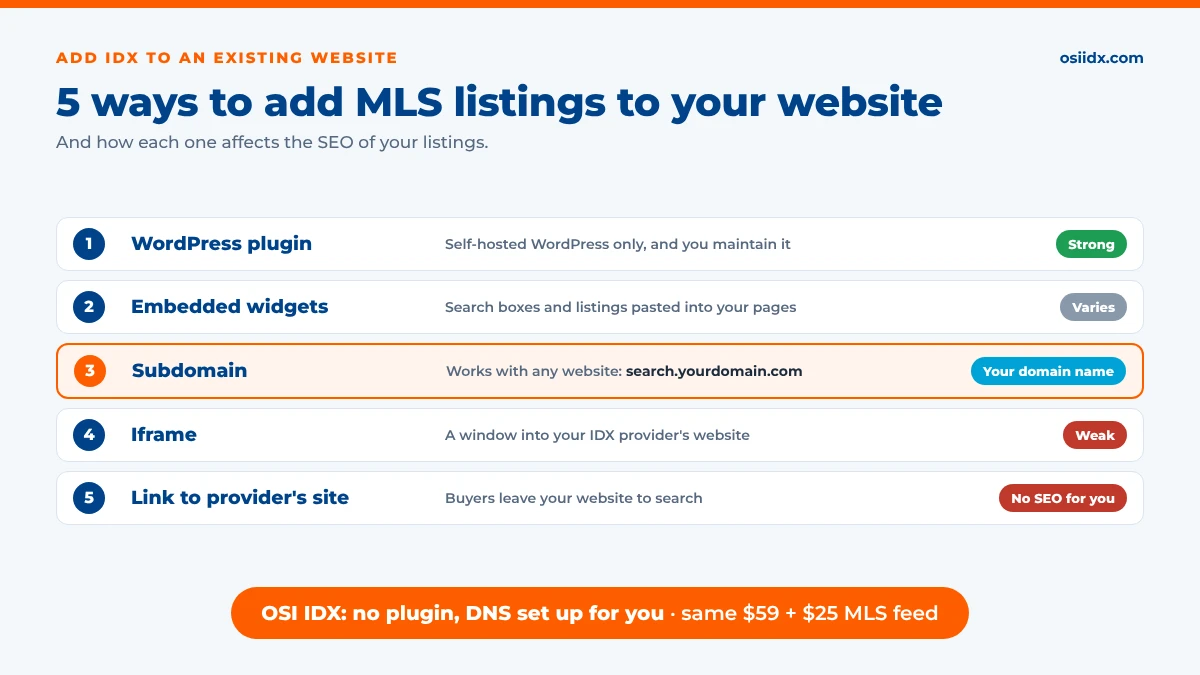
OSI IDX real estate websites with MLS listings can add IDX to the website you already have, with no plugin to install. We set up MLS search on a subdomain of your domain, such as search.yourdomain.com, handle the DNS setup for you, and style it to match your site, with lead capture, CRM integration and listings that update every 10 minutes, for $59/month plus $25/month for the MLS feed. In general, there are five ways to add IDX to an existing website: a WordPress plugin, embedded widgets, a subdomain, an iframe, or a link to your IDX provider’s site. The right one depends on what your website is built with and how much the SEO of your listings matters to you.
Key takeaways
- You don’t need a new website to get IDX. Most websites can add MLS listings with a plugin, widgets, a subdomain, an iframe or a link.
- The method matters for SEO. Listings on your own domain or subdomain can be indexed by search engines. Iframes and links to another site don’t build your website’s SEO.
- WordPress plugins work only on self-hosted WordPress, and you maintain the site. Wix and Squarespace usually rely on widgets or iframes.
- Every method still needs MLS approval, and your broker must authorize your IDX display.
- OSI IDX adds IDX to your existing website on your subdomain, with no plugin, the DNS set up for you, and the same $59 + $25 MLS feed monthly price as a full website.
What do you need before adding IDX to your website?
Whatever method you choose, you’ll need the same few things first:
- MLS membership. You must be a member of the MLS whose listings you want to show.
- Your broker’s approval. IDX display is controlled by your broker, and many MLSs require a signed broker authorization for agent websites.
- An approved IDX provider. Your MLS has to approve the company that delivers the listing feed. A good provider handles the MLS paperwork for you.
- Access to your website or domain. Depending on the method, you or your provider will need your website login or your domain’s DNS settings.
For the full approval process, see how to get IDX on your website. Your website must also follow your MLS’s IDX display rules, whichever method you use.
5 ways to add IDX MLS listings to an existing website
Here’s how each method works and what it means for your website:
| Method | How it works | SEO for your listings | Works on |
|---|---|---|---|
| WordPress plugin | You install the provider’s plugin, and listing pages are created inside your WordPress site. | Strong when listings are rendered on your domain. Some plugins still host listings on a subdomain. | Self-hosted WordPress only |
| Embedded widgets | You paste a script or widget code into your pages to add search boxes, featured listings and listing pages. | Varies by provider. Check that listing details appear in your page source. | Most website builders, including Wix and Squarespace |
| Subdomain | Listings run on a subdomain of your domain, such as search.yourdomain.com, and your menu links to it. | Listing pages are indexable on your own domain name, building your brand rather than someone else’s. | Any website, because it’s set up through your domain’s DNS. This is how OSI IDX adds IDX to existing websites. |
| Iframe | A page on your website shows a “window” into your IDX provider’s site. | Weak. Search engines credit the listings to the provider’s site, not yours. | Almost any website |
| Link to the provider’s site | Your “Search Homes” button sends buyers to a listing site hosted on the provider’s domain. | None for your website. | Any website |
If listings on your own domain matter most to you, a website built with IDX on its main domain is the strongest option for SEO. For more detail, see does IDX help SEO on a real estate website?
Flat, all-inclusive pricing
IDX on your website, with no hidden fees
$99 setup, $59/month website, $25/month per MLS feed. CRM integrations, lead capture, and U.S.-based support included.
How to add IDX by website platform
What’s possible depends on what your current website is built with:
- WordPress (self-hosted). You have the most choices: plugins such as Showcase IDX and IMPress for IDX Broker, widgets, or a subdomain. Showcase IDX is a WordPress plugin, so you supply and maintain the WordPress site, hosting and theme yourself. IDX Broker’s plugin adds widgets to WordPress, while its IDX pages are hosted on a subdomain such as search.yoursite.com.
- WordPress.com. Plugins are only available on WordPress.com plans that allow them. Without one, use widgets, a subdomain or a link.
- Wix. Wix doesn’t have its own IDX. Some providers offer a Wix app or widgets, but many IDX products can only be added to Wix with an iframe.
- Squarespace. IDX is usually added with code blocks for widgets, or with an iframe. Because Squarespace wasn’t built for real estate, check how listing pages are indexed before you choose a provider.
- GoDaddy and other site builders. These usually support embed code or iframes. A subdomain works with any of them, because it doesn’t depend on the website builder.
- A website from another real estate company. If your current site comes from a real estate website provider, it may only work with that company’s IDX. Ask whether they allow a third-party IDX feed, or link your menu to a subdomain.
How to add IDX to your existing website, step by step
The details vary by method, but the process usually looks like this:
- Choose your IDX provider Confirm the provider is approved with your MLS and supports your website platform.
- Get MLS and broker approval Your provider submits the IDX paperwork, and your broker signs off on your display.
- Connect your website Install the plugin, paste the widget code, or point a subdomain to the provider through your domain’s DNS settings.
- Match your branding Set the colors, logo and menu on your search pages so they look like the rest of your website.
- Add search to your pages and menu Add a “Search Homes” link to your main menu and a search box or featured listings to your homepage.
- Turn on lead capture Set up saved searches, favorites and showing requests, and connect your CRM so every lead is sent where you follow up.
Should you add IDX or get a new website?
Adding IDX to your existing website makes sense when you like your current site, it already ranks well in search, or your brokerage requires a specific website. A new website with IDX built in is often the better choice when your current site is hard to update, isn’t mobile-friendly, can only show listings in an iframe, or you’re paying separately for a website, hosting and an IDX plugin.
With OSI IDX, the price is the same either way: $59/month plus $25/month for the MLS feed. On a website we build for you, every listing and search page is a real, crawlable page on your own domain. If you keep your current website, we add IDX on your subdomain.
How OSI IDX adds IDX to your existing website
OSI IDX handles the technical work, so you don’t have to install or update a plugin:
- We get your MLS approval OSI IDX is an approved IDX vendor with 200+ MLSs, and we get your MLS approval for you, usually in minutes to a couple of days.
- We set up your subdomain Your MLS search runs on a subdomain of your domain, such as search.yourdomain.com, and we set up the DNS for you.
- We match your website Your search pages are styled to match your existing website, so buyers move between them naturally.
- Leads go to your CRM Saved searches, favorite homes and showing requests are captured, and leads go to virtually any CRM, with no CRM lock-in.
- Listings stay current Listings and photos update every 10 minutes, and your MLS’s display rules are built in.
There’s no plugin to install, update or troubleshoot, and nothing changes on your current website except a link to your new MLS search.
Frequently asked questions
Can I add IDX to my existing website?
Yes. Most websites can add IDX MLS listings with a WordPress plugin, embedded widgets, a subdomain, an iframe or a link to your IDX provider’s site. OSI IDX adds IDX to your existing website on a subdomain of your domain, with no plugin, for $59/month plus $25/month for the MLS feed.
How do I add IDX to a WordPress website?
On a self-hosted WordPress website, you can install an IDX plugin from your provider, add widgets, or run your MLS search on a subdomain. Plugins require you to maintain WordPress, your hosting and your theme. OSI IDX adds IDX to WordPress websites on your subdomain, so there’s no plugin to install or update.
Can I add IDX to a Wix or Squarespace website?
Yes, but your options are more limited. Wix and Squarespace usually use embedded widgets or iframes, and iframes don’t build your website’s SEO. A subdomain works with any website platform because it’s set up through your domain’s DNS.
Is an iframe bad for IDX?
For SEO, yes. An iframe shows listings from your IDX provider’s website inside your page, so search engines credit those listings to the provider’s site rather than yours. It’s the simplest method, but it doesn’t help your website rank for listing searches.
Do I need a new website to get IDX?
No. You can add IDX to the website you have. A new website is often the better choice if your current site is hard to update, can only show listings in an iframe, or costs more in hosting and plugins. With OSI IDX, a new website and adding IDX to your existing website cost the same: $59/month plus $25/month for the MLS feed.
How long does it take to add IDX to an existing website?
It depends mostly on MLS approval and how your website is connected. With OSI IDX, MLS approval usually takes minutes to a couple of days, and we set up your subdomain and DNS for you.
About OSI IDX: OSI IDX builds IDX-integrated real estate websites for REALTORS® and brokers, with support for more than 200 MLSs and new MLSs added weekly. Listing data is refreshed every 10 minutes. OSI IDX is a product of OSI Express, a family-owned real estate technology company founded in 1982.
See what agents say about OSI IDX:
Better Business Bureau A+ Rating |
Trustindex Reviews |
G2 Reviews |
More Customer Reviews
Unlike many IDX website providers, OSI IDX offers one flat price that includes every feature: CRM integrations, buyer saved searches with automatic listing alerts, and a design team that builds your website for you using licensed Getty Images®. Other providers may advertise a lower starting price, but they often use tiered plans, so you pay more to unlock features that come standard with OSI IDX.
See how it works.

Sources
- Showcase IDX plugin listing and installation guide (wordpress.org, support.showcaseidx.com)
- IMPress for IDX Broker plugin listing: IDX hosting on a subdomain (wordpress.org)
- IDX Broker support center: integrating IDX with a Wix site (support.idxbroker.com)
- iHomefinder: IDX for any website, and Squarespace and Wix IDX guides (ihomefinder.com)
- Duda: how to integrate IDX Broker with a website builder (duda.co)
 Reddit