How Do I Get IDX on My Website?
The steps, signatures, and MLS approval it takes to show IDX listings on your real estate website, and how long each part takes.
Quick answer
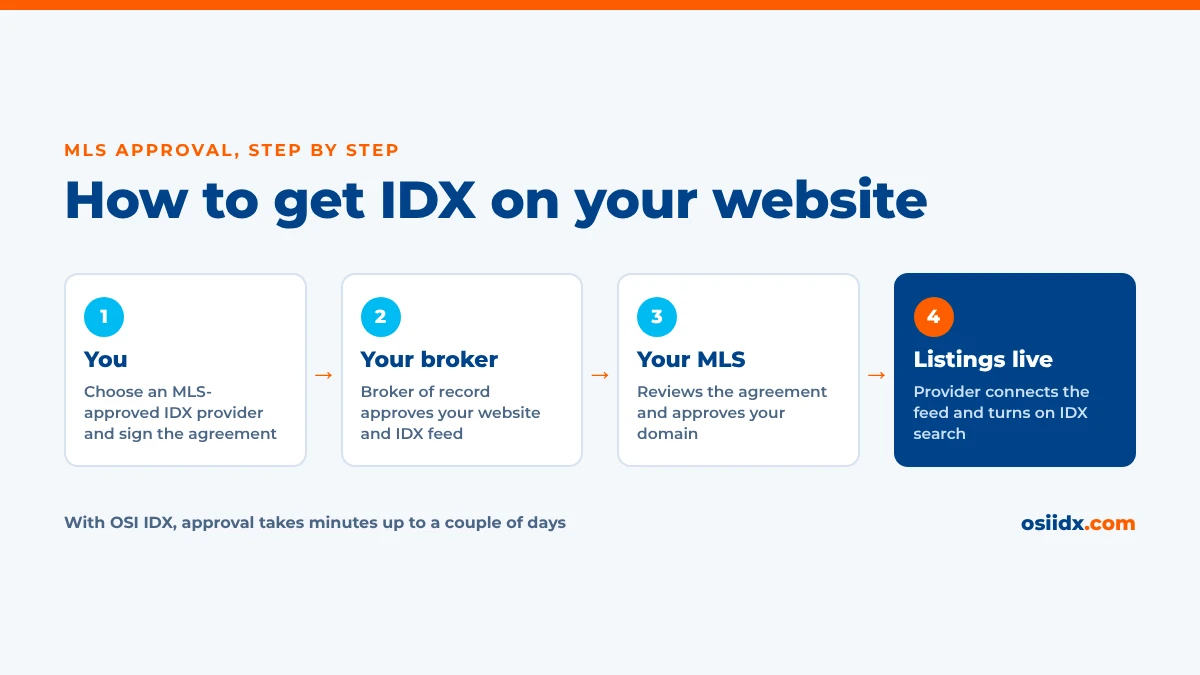
To get IDX on your website, you need three things: an active MLS membership, your broker’s approval, and an IDX provider that is approved by your MLS. You choose a provider, then you, your broker of record, and the provider sign your MLS’s IDX agreement. Once the MLS approves it, the provider connects the listing feed to your website. With OSI IDX real estate websites, our team handles the MLS paperwork for you and obtains approval in minutes up to a couple of days.
Key takeaways
- You must be an active MLS member, and in most MLSs your broker of record must approve your IDX website.
- IDX approval is tied to your provider and your domain. A new provider, brokerage, or web address usually means new paperwork.
- Approval doesn’t have to take long. When your provider is already approved by your MLS and handles the paperwork, it can come through in minutes.
- Your provider should handle the MLS agreement for you. OSI IDX completes the licensing paperwork while your website is being built.
Who can get IDX on their website?
IDX (Internet Data Exchange) is a program run by your local MLS, so the MLS decides who can use it. The basic requirements are the same almost everywhere:
- An active MLS membership. You need to be a current, paid member of the MLS whose listings you want to show.
- A broker who approves it. IDX is a broker-level program in most MLSs. Agents can use it, but their broker of record has to sign off.
- An approved IDX provider. Your MLS only sends listing data to vendors who have signed its data license agreement.
- A website address. Most MLSs approve IDX for a specific domain, so you need to know where the listings will appear.
Rules vary from one MLS to the next. Some allow agents to apply directly with their broker’s signature, while a few only let the brokerage itself hold the IDX agreement. Your provider should know your MLS’s rules before you sign up. New to IDX? Start with what IDX is and how it works on a real estate website.
What are the steps to get IDX on your website?
The process looks similar in every MLS, even though the forms differ:
- Choose an IDX provider Pick a provider that is already approved by your MLS. If it isn’t, your approval can’t start until the provider gets approved first. Check whether OSI IDX supports your MLS.
- Sign the IDX agreement Your provider starts the agreement your MLS requires. You sign it, and it covers how listings may be displayed on your website.
- Get your broker’s signature The agreement goes to your broker of record, who approves your website and the IDX feed. This is the step that most often stalls.
- Wait for MLS approval The MLS reviews the signed agreement, confirms your membership, and approves the provider to send data for your domain.
- Connect the feed and go live Your provider receives the data connection, loads the listings, and turns on search on your website.
Some providers hand you the forms and leave the rest to you. Ask up front who completes the paperwork, who follows up with your broker, and who tracks the MLS approval. With OSI IDX, we do it all for you, from the agreement to the final approval.
Flat, all-inclusive pricing
IDX on your website, with no hidden fees
$99 setup, $59/month website, $25/month per MLS feed. CRM integrations, lead capture, and U.S.-based support included.
How long does IDX approval take?
With an experienced provider like OSI IDX, IDX approval takes minutes up to a couple of days. When approval takes longer, it’s almost always because one step in the chain is waiting on someone:
| Step | With OSI IDX | What can slow it down |
|---|---|---|
| You sign | Minutes | Missing MLS ID or web address |
| Broker signs | Minutes | Broker misses the email |
| MLS approves | Minutes to 2 days | Fees due or a site review |
| Feed goes live | Right after approval | Provider not MLS-approved |
The quickest way to speed things up is to tell your broker the agreement is coming so they sign it as soon as it arrives. If your approval sits in “pending” for more than a couple of days, ask your provider to check with the MLS directly.
What does your MLS check before approving IDX?
Beyond the signatures, many MLSs check that your website will follow their display rules. Common requirements include:
- Your brokerage name, and sometimes its logo, shown on the website
- The listing brokerage shown on every IDX listing
- The MLS disclaimer and data source notice on listing pages
- A working website on the domain listed in the agreement
- Any IDX fees paid directly to the MLS or board
A few MLSs review the finished website before they turn on the feed, so they can confirm it follows these rules. A good IDX provider builds them into every page, so you don’t have to track them yourself.
Do you need new approval if something changes?
Often, yes. IDX approval covers a specific agent, broker, provider, and website, so changing any of them can mean new paperwork:
| If you change | New approval needed? |
|---|---|
| IDX provider | Yes. Approval belongs to the provider, so your new provider files its own agreement. |
| Brokerage | Yes. Your new broker of record has to approve your website. |
| Domain or web address | Usually. Many MLSs approve IDX one domain at a time. |
| Second MLS | Yes. Each MLS has its own agreement and approval. |
If you’re planning a move, start the new agreement before you switch so your website isn’t left without listings.
How does OSI IDX handle IDX approval?
We handle it for you. When you sign up, your onboarding specialist starts the license agreements your MLS requires while our design team builds your website on a private staging site. You don’t fill out MLS forms or track down approvals yourself. We send the agreement, follow up with your broker, and work with the MLS until approval comes through.
OSI IDX is an approved vendor with more than 200 MLSs nationwide, and we add new MLSs every week. We obtain approval in minutes up to a couple of days, usually well before your website is finished. If your broker or MLS needs more time, your specialist keeps you updated until your listings are live. Once they are, your listings refresh every 10 minutes, including photos.
Want the full timeline? See how an OSI IDX website gets built, from onboarding to launch.
Frequently asked questions
Can a real estate agent get IDX without their broker?
Can my website go live before IDX is approved?
Does it cost money to get IDX approved?
Can I add IDX to a website I already have?
Can I show listings from more than one MLS?
About OSI IDX: OSI IDX builds IDX-integrated real estate websites for REALTORS® and brokers, with support for more than 200 MLSs and new MLSs added weekly. Listing data is refreshed every 10 minutes. OSI IDX is a product of OSI Express, a family-owned real estate technology company founded in 1982.
See what agents say about OSI IDX:
Better Business Bureau A+ Rating |
Trustindex Reviews |
G2 Reviews |
More Customer Reviews
Unlike many IDX website providers, OSI IDX offers one flat price that includes every feature: CRM integrations, buyer saved searches with automatic listing alerts, and a design team that builds your website for you using licensed Getty Images®. Other providers may advertise a lower starting price, but they often use tiered plans, so you pay more to unlock features that come standard with OSI IDX.
See how it works.